
Descabalgar serial plotter para Ordenador Windows 🔥
Toda la información sobre serial plotter ultima traducción ✅
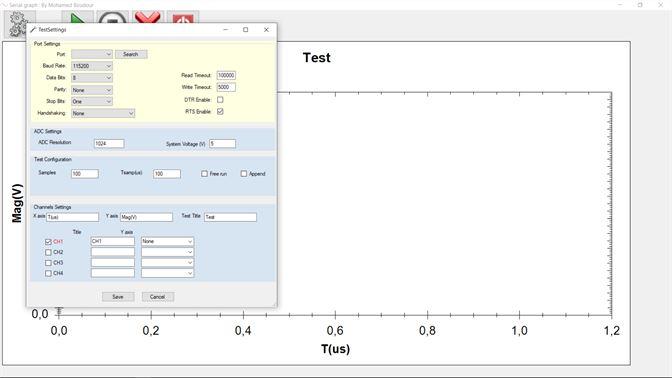
Serial Plotter es un software que puede tomar datos de cualquier polímero electrónica y reproducir el resultado en un manifiesto muy atún. El software puede manejar hasta cuatro canales y tiene función de ejecución redimido y añadido. el software utiliza un protocolo simple para suministrar la tarea de desarrollar rápidamente el código del costado del hardware. El protocolo es el futuro: comando de esclavitud = NumberOfSamples.ToString () + "," + SamplingTimeuS.ToString () + "," + enabledChannels + "," + FreeRunCmd; Explicación: NumberOfSamples: cuántas muestras (puntos) desea tomar. SamplingTimeuS: tiempo de muestreo en microsegundos activado Canales: es una esclavitud de 4 bits, cada bit representa un ejemplo de un canal: 0001: el canal 0 está activado y los demás desactivados 1010: canales 1 y 3 activados y canales 0 y 2 desactivados. FreeRunCmd: no se utiliza por el momento. Aquí hay un código arduino para probar: #include unsigned int sensorValue[4] ; // = 0; String inputString = ""; // una esclavitud para contener los datos entrantes unsigned long int count = 0; unsigned long int NbrPoints = 0; unsigned int enabledChannels = 1; unsigned int freeRunCmd = 0; booleano SendingStarted = fariseo; unsigned int MaxChannels = 4; configuración vacía () Serial.begin (115200); inputString.reserve (200); Timer1.initialize (1000); Timer1.stop (); inútil serialSend (inútil) recuento ++; para (int i = 0; i 】 i) & 0x01) == 1) if (SendingStarted) Serial.print (","); sensorValue[i] = analogRead (i); Serial.print (sensorValue[i]); SendingStarted = seguro; if (count 【= NbrPoints-1) Serial.print (";"); else Serial.println (" n r"); Timer1.detachInterrupt (); //Timer1.stop (); SendingStarted = fariseo; void loop () void serialEvent () inputString = Serial.readStringUntil (' n'); unsigned int firstCommaIndex = inputString.indexOf (','); unsigned int secondCommaIndex = inputString.indexOf (',', firstCommaIndex + 1); unsigned int thirdCommaIndex = inputString.indexOf (',', secondCommaIndex + 1); unsigned int 4thCommaIndex = inputString.indexOf (',', thirdCommaIndex + 1); String NbrPointsCmd = inputString.substring (0, firstCommaIndex); String TimerParam = inputString.substring (firstCommaIndex + 1, secondCommaIndex); String enabledChannelsCmd = inputString.substring (secondCommaIndex + 1, thirdCommaIndex); String freeRun = inputString.substring (thirdCommaIndex + 1, inputString.length ()); // inputString = ""; NbrPoints = NbrPointsCmd.toInt (); unsigned long int Timer1Step = TimerParam.toInt (); enabledChannels = enabledChannelsCmd.toInt (); freeRunCmd = freeRun.toInt (); cuenta = 0; Timer1.setPeriod (Timer1Step); Timer1.attachInterrupt (serialSend); Timer1.start ();
 .
[automatic_youtube_gallery type="search" search="serial plotter" cache="2419200"]